如果遇到有些 工具包 下载不下来,可以用这一招
export http_proxy=http://127.0.0.1:7890
export https_proxy=http://127.0.0.1:7890
export HTTP_PROXY=http://127.0.0.1:7890
export HTTPS_PROXY=http://127.0.0.1:7890
注意
http_proxy /https_proxy 是区分大小写的!
- 小写 :
http_proxyhttps_proxy
→ 绝大多数工具认:curl、wget、git、npm、yarn、apt、brew… - 大写 :
HTTP_PROXYHTTPS_PROXY
→ 部分软件认,部分不认
最安全、永远不出错的写法:大小都写。
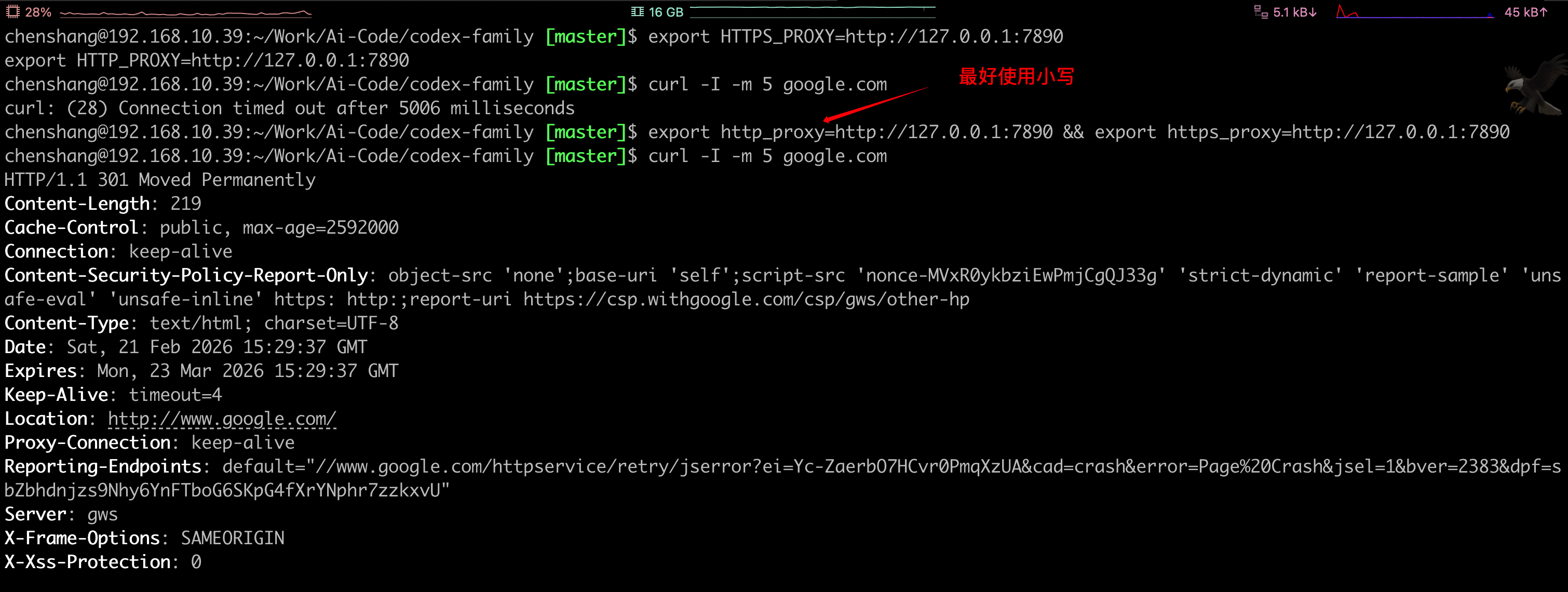
如果不开启代理访问google,肯定超时
curl -I -m 5 google.com
curl: (28) Connection timed out after 5006 millisecond
开启代理,不明确告诉curl 走代理,肯定超时
curl -I -m 5 google.com
curl: (28) Connection timed out after 5006 millisecond
没有开启代理,还强行让curl 走代理,肯定不行
curl -I -m 5 --proxy http://127.0.0.1:7890 google.com
curl: (7) Failed to connect to 127.0.0.1 port 7890 after 0 ms: Couldn't connect to server
开启代理,在告诉curl 走代理,才可以访问成功
curl -I -m 5 --proxy http://127.0.0.1:7890 google.com
HTTP/1.1 301 Moved Permanently
Content-Length: 219
Cache-Control: public, max-age=2592000
Connection: keep-alive
Content-Security-Policy-Report-Only: object-src 'none';base-uri 'self';script-src 'nonce-OvBOeOyz5jzQ1efUzLnM7w' 'strict-dynamic' 'report-sample' 'unsafe-eval' 'unsafe-inline' https: http:;report-uri https://csp.withgoogle.com/csp/gws/other-hp
Content-Type: text/html; charset=UTF-8
Date: Sat, 21 Feb 2026 15:20:53 GMT
Expires: Mon, 23 Mar 2026 15:20:53 GMT
Keep-Alive: timeout=4
Location: http://www.google.com/
Proxy-Connection: keep-alive
Reporting-Endpoints: default="//www.google.com/httpservice/retry/jserror?ei=Vc2ZabbKNOrx1e8Ps5PnuAY&cad=crash&error=Page%20Crash&jsel=1&bver=2383&dpf=sbZbhdnjzs9Nhy6YnFTboG6SKpG4fXrYNphr7zzkxvU"
Server: gws
X-Frame-Options: SAMEORIGIN
X-Xss-Protection: 0
-I 就是 只请求头部,不下载网页内容否则会输出如下
curl -m 5 --proxy http://127.0.0.1:7890 google.com
`<HTML><HEAD>``<meta http-equiv="content-type" content="text/html;charset=utf-8">`
`<TITLE>`301 Moved `</TITLE></HEAD>``<BODY>`
`<H1>`301 Moved `</H1>`
The document has moved
`<A HREF="http://www.google.com/">`here `</A>`.
`</BODY></HTML>`